


One of the services we offer at Assertiv is application onboarding. This is a unique area of specialisation, as complexity can wildly differ from application to application. We’ve seen customers get burned when they assume their use-case is straight forward. In this blog, I want to show you a unique use case on the more complex end of the spectrum, but one that could provide a strong security control where one doesn’t exist today.
By the way – If you’re facing app onboarding dramas, you can book in a short 15 minute Teams call with us to see if we can help you.
The Ask
We had a requirement to onboard a SaaS application to Entra for SSO via SAML. Pretty straight forward so far. However, we were asked if there was a way to somehow use SSO to also protect the Administrative account for the application too, to keep the login experience standard for all use cases.
Why is This Hard?
This gets a little complicated, as SaaS applications differ from app to app. Performing an SSO to an administrative account would typically require you to log into Entra with that Administrator account first, which requires MFA, which can cause headaches if the account has a shared credential (either shared manually [low maturity] or via PAM/Vault).
The Proposal
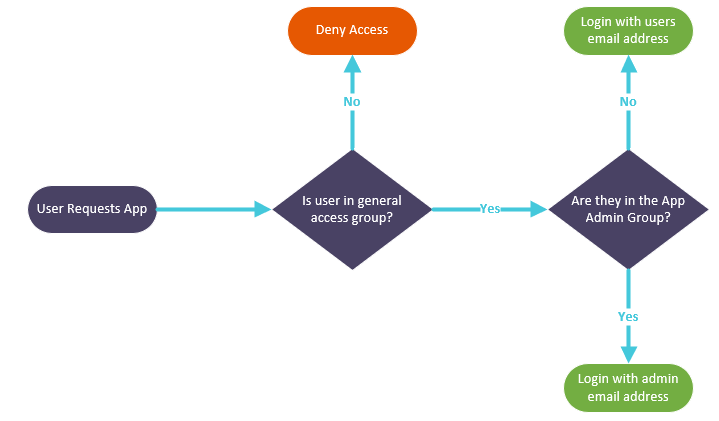
Pushing products beyond the norm is an area we often find ourselves. And this scenario is no different. We proposed using transformation logic in the SAML attribute statement, specifically for the NameID. If the user was a member of a specific Administrative cloud security group, let’s rewrite their email address completely, and replace it with the email address of the administrative user in the SaaS application.
This is what we were going for:
How Did We Do It?
I’ll skip over the regular SAML set up, it’s not exciting. We created 2 groups, one for regular user access which was assigned to everyone who needed access to the application day-to-day, including people administering the system. The second was dedicated for assigning to people who needed to SSO to the application as the admin user, let’s call it the administrative app group.
Here’s a bit of the secret sauce for achieving dynamic NameIDs at access time. In Attributes & Claims, edit the Name ID claim in your SAML application, and navigate down to Claim Conditions.
Create two conditions, first is with User Type as ‘Members’, Scoped Groups set to the regular group for accessing this application, and the source mapping to user.mail (or whatever the mapped identifier is for you application).
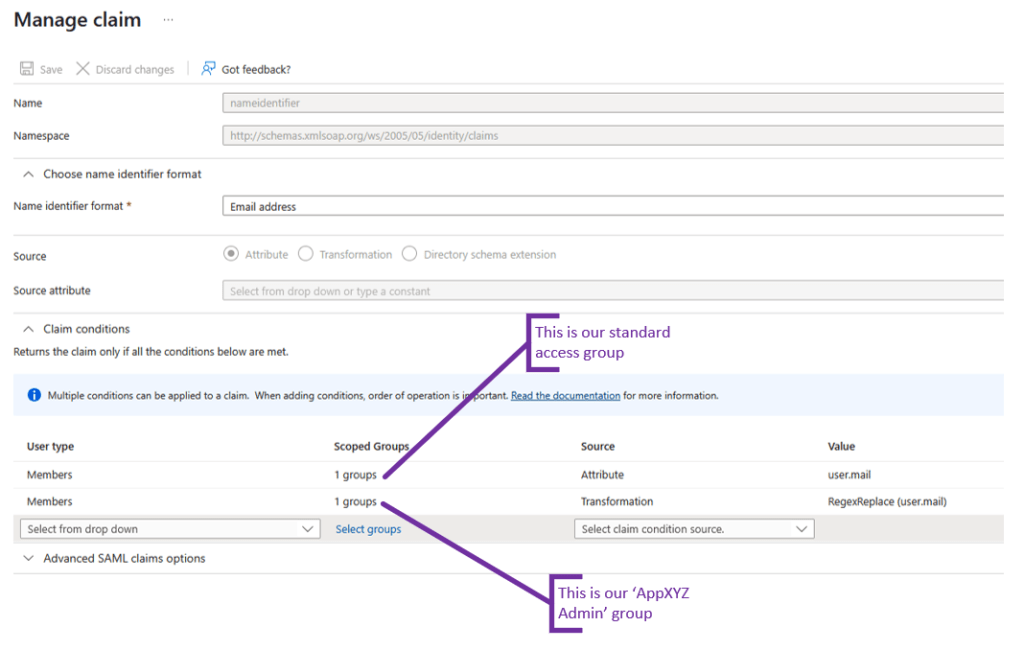
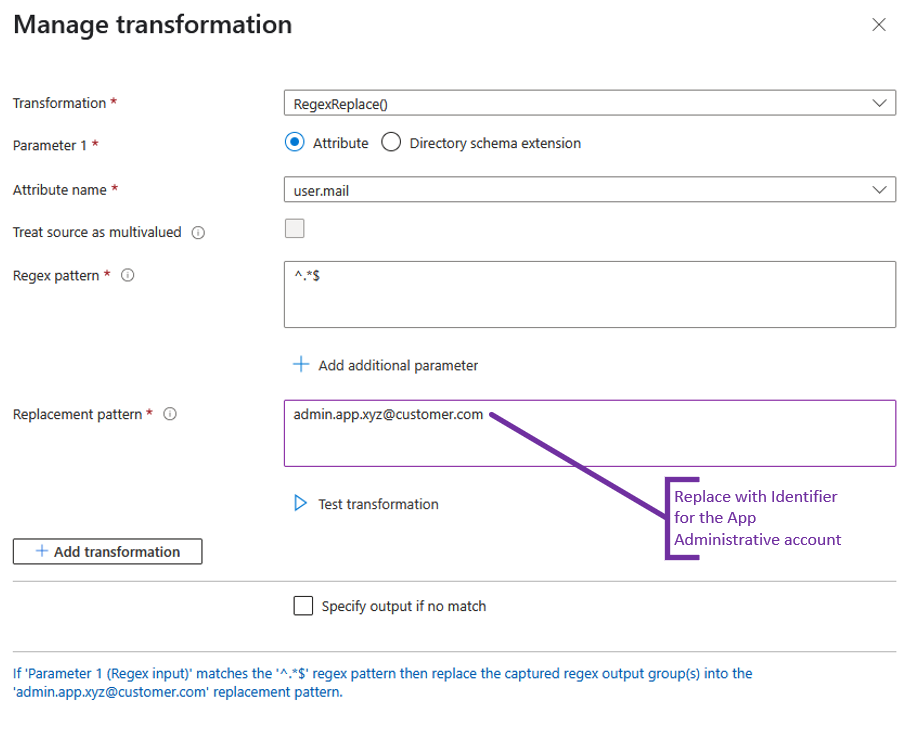
For the second claim condition create with User Type as ‘Members’ as well, for the Scoped Groups, set to the Administrative group for the application. For Source, select Transformation, and use the following settings:
Transformation: RegexReplace()
Parameter 1: Attribute
Attribute Name: user.mail (this is just a placeholder)
Regex pattern: ^.*$
Replacement pattern: <enter the identifier of the administrator account you want to SSO to>
Now ordering is really important here, so ensure that the second claim is definitely listed second, otherwise it won’t work.
Tightening Security Further
Entra has some cool features out of the box, depending on your licence. In our case the Entra tenancy had P2 capability, which grants Privileged Identity Management (PIM) capability, we can use that!
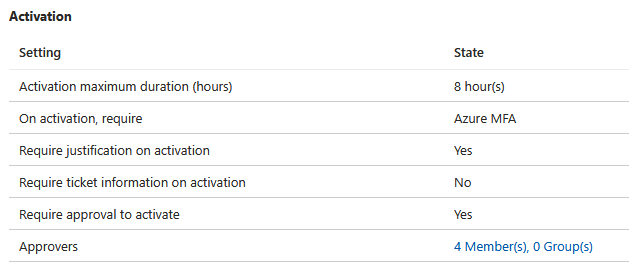
Ideally this Administrative account was only used when it was required, e.g. during a change window or break glass emergency scenario. So it was agreed to limit access. PIM provides a mechanism for users to request temporary access to the Administrative group for the application. We can configure whether an approval is required, and the maximum access time.
So we onboarded the group to PIM, and put some security controls around it such as MFA on access assignment and approvals, which can be relaxed or tightened in the future depending on requirements.
The Outcome?
This was an application that started with no SSO, users had a separate credential to log directly into the app. What’s more is that the administrative account password was being shared between team members.
The outcome resulted in a better login experience for the end users. They were able to log in with their corporate Entra account credentials, which were also MFA enabled. Furthermore, privileged account passwords were no longer being shared between team members, and tighter security controls were placed on when the account could be used.
It is ultimately a significant maturity uplift, which closes many open gaps. The solution is manageable, and not overly complex. This approach is also repeatable for other applications, which opens the door for standardising application onboarding for this organisation.
If you’d like our team to help you build a great app onboarding experience for you, whilst also strengthening security controls, I encourage you to book a short 15 minute call to talk through your needs.